
Post To Tumblr Version 0.4
Today is a small update day it seems.
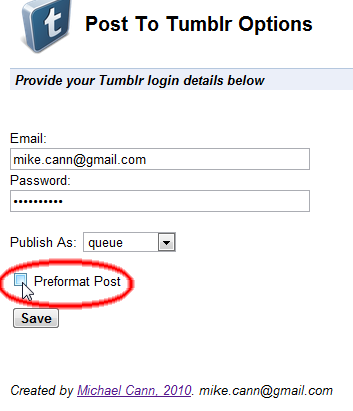
I have updated my Post To Tumblr extension again. I was getting a couple of requests for the ability to add a 'caption' to a post before the image is uploaded so I cranked out this little feature. You can enable it in the options.
Once enabled rather than immediately posting the image it will popup a new tab allowing you to add a caption or whatever to your post:
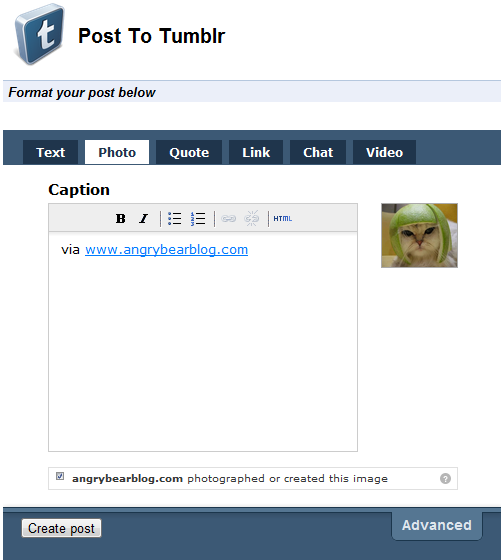
Its not perfect, I would have preferred the pre formatting window to open in a div popup on the current page instead of a whole new tab, but for now this solution is simple and it works.
I must admit I borrowed the idea from another Tumblr posting extension called "Share on Tumblr". The code is ultra simple:
<html>
<head>
<script>
// Thanks to share on tumblr extension for this
chrome.tabs.getSelected(null, function (tab) {
var url = getParam(tab.url, "u");
//var url = encodeURIComponent(getParam(tab.url,"u"));
var finalurl = "https://www.tumblr.com/share?v=3&u=" + url + "&s=";
document.getElementById("container").src = finalurl;
});
// Thanks https://www.netlobo.com/url_query_string_javascript.html
function getParam(url, name) {
name = name.replace(/[[]/, "\[").replace(/[]]/, "\]");
var regexS = "[\?&]" + name + "=([^&#]*)";
var regex = new RegExp(regexS);
var results = regex.exec(url);
if (results == null) return "";
else return results[1];
}
</script>
<link rel="stylesheet" href="main.css" type="text/css" />
</head>
<body>
<div id="header">
<h1>Post To Tumblr</h1>
</div>
<div class="section-header first"><em>Format your post below</em></div>
<br />
<iframe id="container" style="width:500px;height:430px;border:0px" src=""></iframe>
</body>
</html>It just opens an iframe with the Tumblr Share page. Simples!
SINCE THIS POST


GET NEW POSTS BY EMAIL
About one post a month on AI, coding, games and side projects. No spam, unsubscribe any time.