
My First Chrome Extension - "Post To Tumblr"
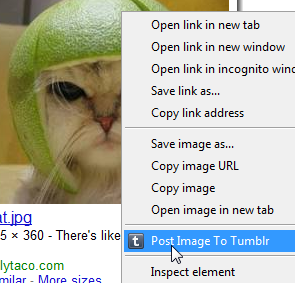
Woo! I have just published my first Chrome extension :)
It was really annoying me that when I found a funny cat or some other silly image I would have to go through an annoying process to get that image on my Tumblr account.
What I really wanted was some right-click-post action going on and wondered why no one had done one it yet. So with an hour or so to spare I whipped this extension up really quick.
It uses the Chrome 6 Context Menu API so you obviously need to have Chrome 6 to be able to use it.
Currently it only posts images as that's all I needed for now but if enough people want more then ill whip out the other data types.
The source couldn't be any simpler really, infact this is it here:
chrome.contextMenus.create({
  title: "Post Image To Tumblr",
  contexts: ["image"],
  onclick: postImage,
});

function postImage(info, tab) {
  var email = localStorage["tumblr_email"];
  var password = localStorage["tumblr_pass"];

  if (!email || email == "" || !password || password == "") {
    alert("Need to set your Tumblr username and password in the options before posting!");
  } else {
    var o = {
      email: email,
      password: password,
      type: "photo",
      source: info.srcUrl,
    };

    var success = function (data, textStatus, request) {
      if (textStatus == "success") {
        alert("Image posted to Tumblr. Image -> " + info.srcUrl);
      } else {
        alert("Bad email or password");
      }
    };

    $.post("https://www.tumblr.com/api/write", o, success);
  }
}
Simples!
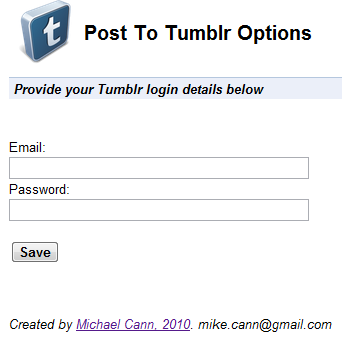
Theres even an option page where you put in your Tumblr details:
Oh, there is one issue.
No matter what I tried I couldn't manage to get the Tumblr API to return an error. So if you enter your username or password incorrectly it still reports success, not entirely sure why, if someone knows I would love to hear why!
Interested? You can go grab it over on the chrome extensions gallery page -> HERE
SINCE THIS POST


GET NEW POSTS BY EMAIL
About one post a month on AI, coding, games and side projects. No spam, unsubscribe any time.